Construction Takeoff Software: Measure Once, Price Everything
Construction takeoff software lets you measure quantities from plans, photos or satellite images on screen, instead of printing drawings and using a scale ruler. The best takeoff software goes one step further: the measurements feed your estimate directly, so 1,200 sq ft of drywall becomes sheets, mud, tape, screws and labor hours without retyping a number.
This guide explains what a construction takeoff is, the types of takeoff, how to do one step by step, what to look for in takeoff software, and how takeoff works in Bolster.
What is a takeoff in construction?
A takeoff (also called a quantity takeoff or material takeoff) is the process of pulling measurable quantities out of a project so you can price it. The estimator "takes off" the numbers from the drawings. A takeoff answers questions like:
- Area: How many square feet of flooring, drywall, roofing, siding or deck surface?
- Length: How many linear feet of fence, trim, baseboard, wall framing or gutter?
- Volume: How many cubic yards of concrete for the footings and slab?
- Count: How many doors, windows, posts, fixtures, outlets or footings?
The takeoff is the foundation of the estimate. If the quantities are wrong, the price is wrong, no matter how good your unit costs are.
Material takeoff vs quantity takeoff
The terms are used interchangeably, but there is a useful distinction. A quantity takeoff measures the geometry: 640 sq ft of wall. A material takeoff converts that into what you buy: 20 sheets of 4 x 8 drywall plus 10% waste, 3 buckets of compound, 2 rolls of tape. Good takeoff software does both in one step by linking measurements to items with formulas.
How to do a construction takeoff: step by step
- 1. Get the right documents. Current plans, elevations and specifications. For remodels and exterior work with no plans, use photos or satellite imagery and site measurements.
- 2. Set the scale. Calibrate by selecting a known dimension on the drawing, such as a door width or a dimensioned wall. This is the step most errors come from, so check it on two dimensions.
- 3. Work in a consistent order. Go trade by trade or room by room and use layers or colors so nothing is measured twice or missed.
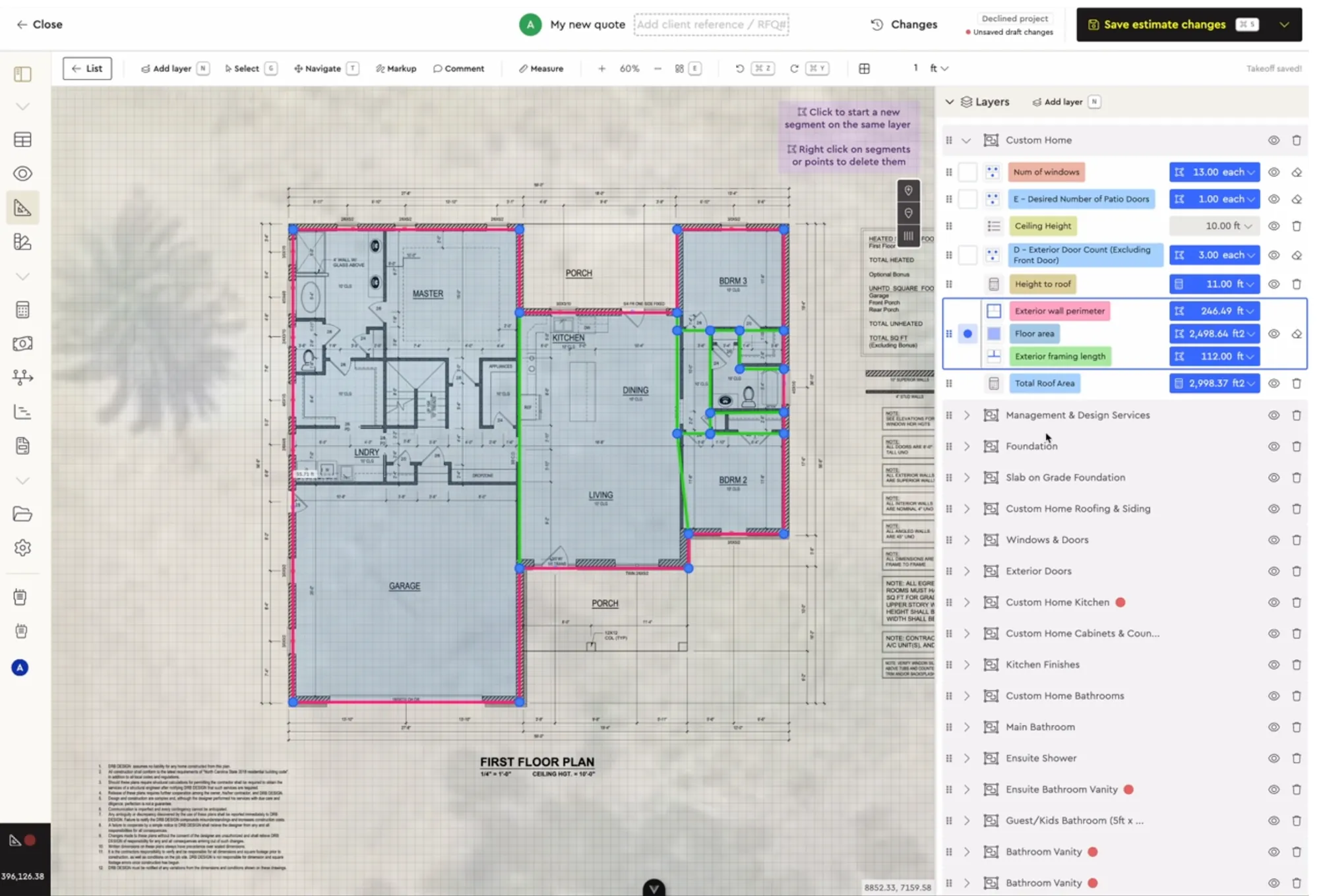
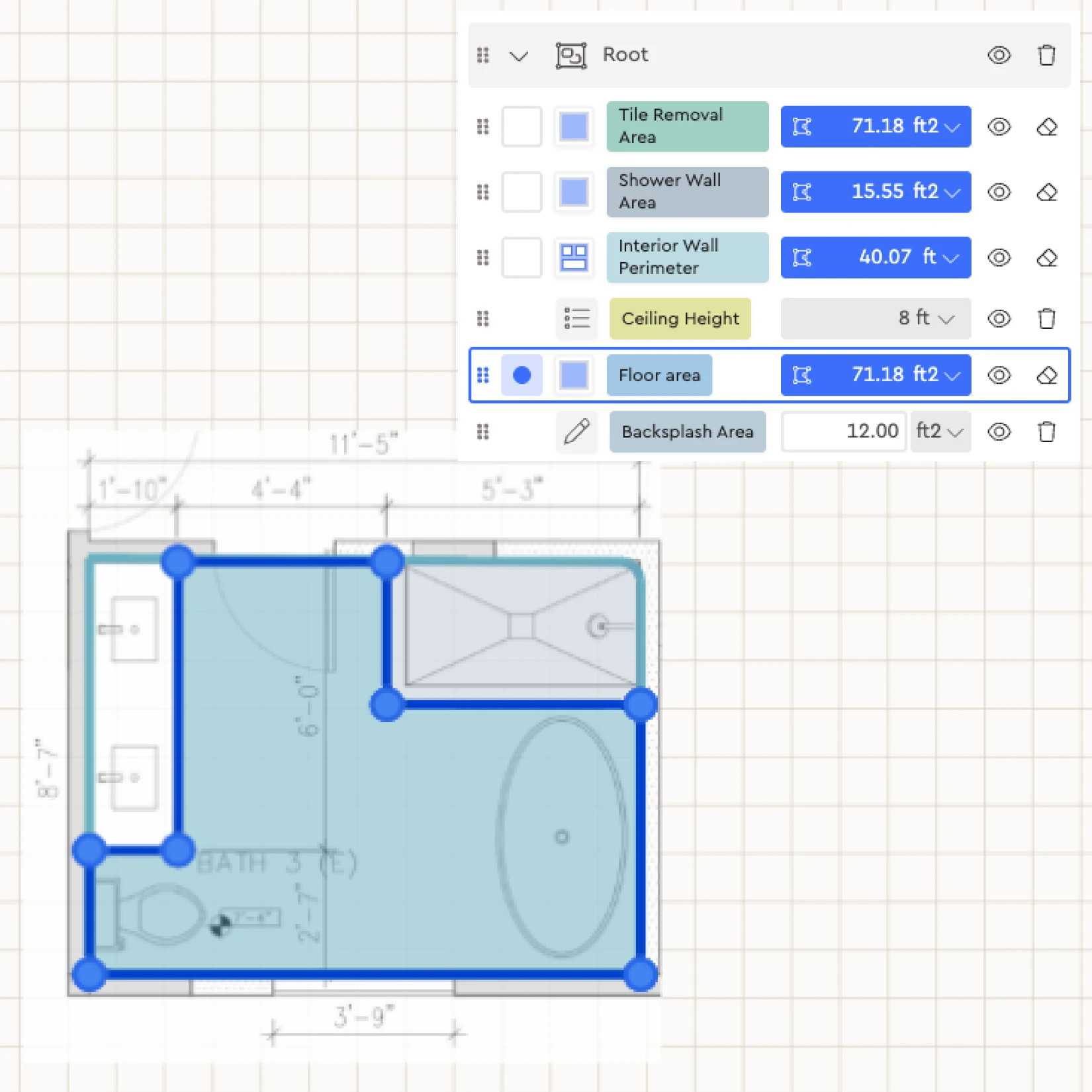
- 4. Measure areas, lengths and counts. Trace floor areas, run linear measurements along walls and fences, and click to count fixtures and openings.
- 5. Apply waste factors. Add sensible waste for cuts and breakage (often 5 to 15% depending on the material and layout).
- 6. Convert to materials and labor. Turn each measurement into purchasable units and labor hours. This is where linking takeoff to assemblies saves the most time.
- 7. Review. Compare totals against a similar past job. A bathroom with twice the usual tile is either a big bathroom or a mistake.
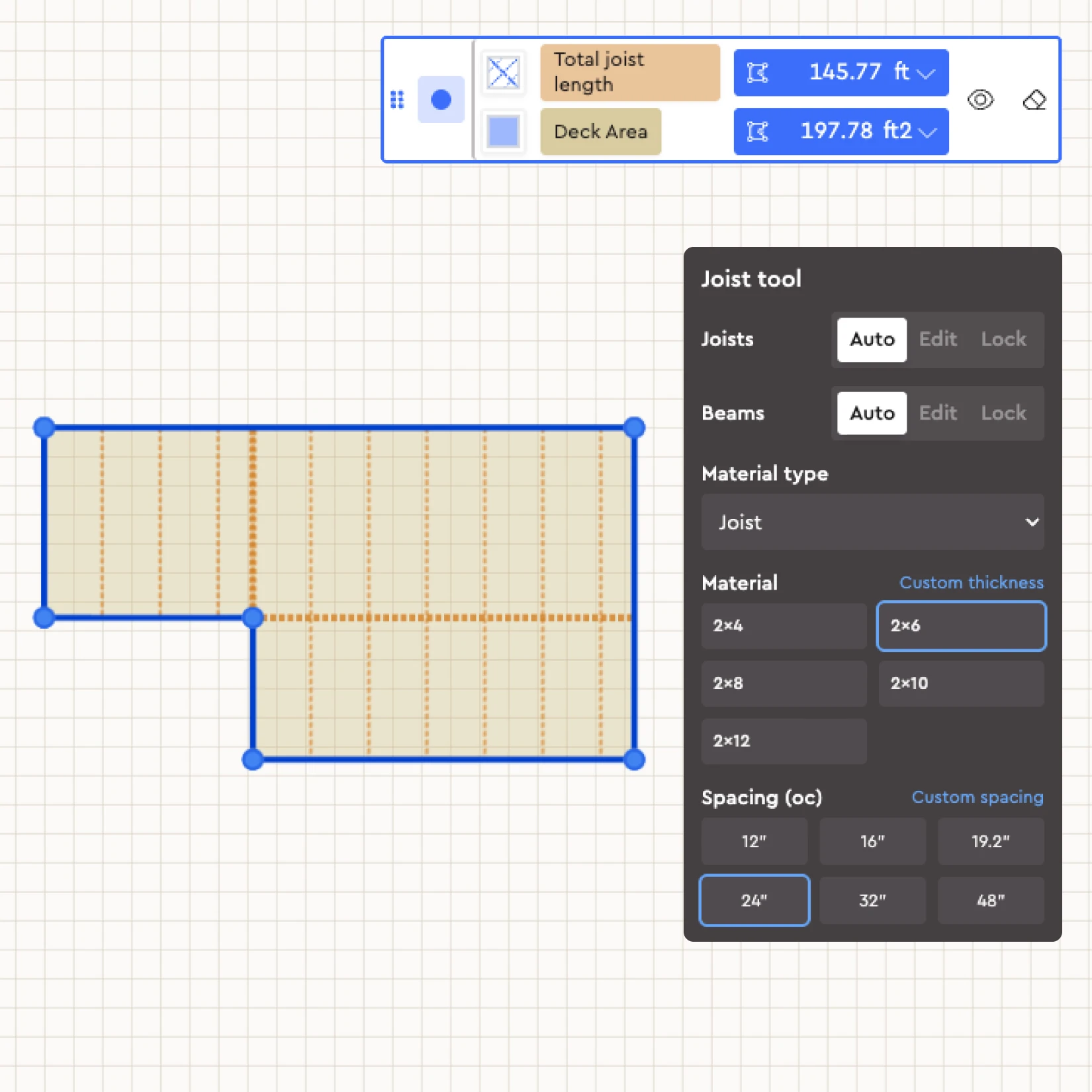
Worked example (illustrative): a 14 x 20 ft deck. Area takeoff gives 280 sq ft of decking surface. Perimeter gives 68 linear feet of fascia and railing (less the house side). Joists at 16 inches on center across 20 ft gives 16 joists, plus rim joists. Posts at roughly 6 to 8 ft spacing gives about 8 posts and footings. Linked to a deck assembly, those four measurements price boards, fasteners, hardware, concrete and labor in one pass.
What to look for in construction takeoff software
- Works with how jobs arrive. Plans for new builds, but also photos and satellite views for remodels, roofing, fencing and landscaping where there are no drawings.
- Scale calibration that is quick and easy to verify.
- Area, length and count tools, plus specialty tools for things like framing.
- Layers so you can organize by trade or phase and show or hide them.
- Direct link to the estimate. The most important feature. If you have to export to Excel and type the quantities into your estimating tool, you have only solved half the problem.
- Reusable templates for the jobs you do every week.
- Cloud access and collaboration so office and field can see the same takeoff.
- Export to Excel when you need to share quantities with a supplier.
Blueprint takeoff vs on-screen takeoff vs AI takeoff
A blueprint takeoff on paper means printing plans and measuring with a scale ruler and highlighters. On-screen (digital) takeoff does the same on a computer with click-to-measure tools, which is faster and easier to check. AI takeoff reads uploaded plans and suggests quantities automatically, which you then review and adjust. All three still need an estimator's judgment. The win comes from connecting the result to pricing.
Common takeoff mistakes
- Wrong or unverified scale. A plan printed at the wrong size or a scale set from a single dimension throws every measurement off. Check scale against two known dimensions.
- Measuring twice or not at all. Overlapping areas on multiple sheets get counted twice, and small rooms get skipped. Layers and a consistent order fix both.
- Forgetting waste and overlaps. Roofing, siding and tile need waste and lap allowances that differ by material and pattern.
- Mixing net and gross areas. Decide whether wall areas include or exclude openings, and stay consistent with how your labor rates are set.
- Retyping quantities. Every time a number is copied from a takeoff into a separate estimate, there is a chance it is copied wrong. Linking measurements to assemblies removes that step.
- Using old plans. Confirm the revision date before you start. Revisions after permit are common on residential work.
How takeoff works in Bolster
Bolster's takeoff tool is built for residential contractors and specialty trades, and it lives inside the same platform as your estimate.
- Import plans, use satellite imagery or draw. Upload a PDF plan, pull up the property from a street address, or sketch from scratch when there are no drawings.
- Measure areas, lengths and counts, with scale calibration from any known dimension.
- Joist and beam tool. Plan framing automatically with custom material thickness and spacing, which is especially useful for decking and framing-heavy jobs.
- Layers. Add PDFs, photos and imagery as layers, then show, hide, duplicate or reorder them.
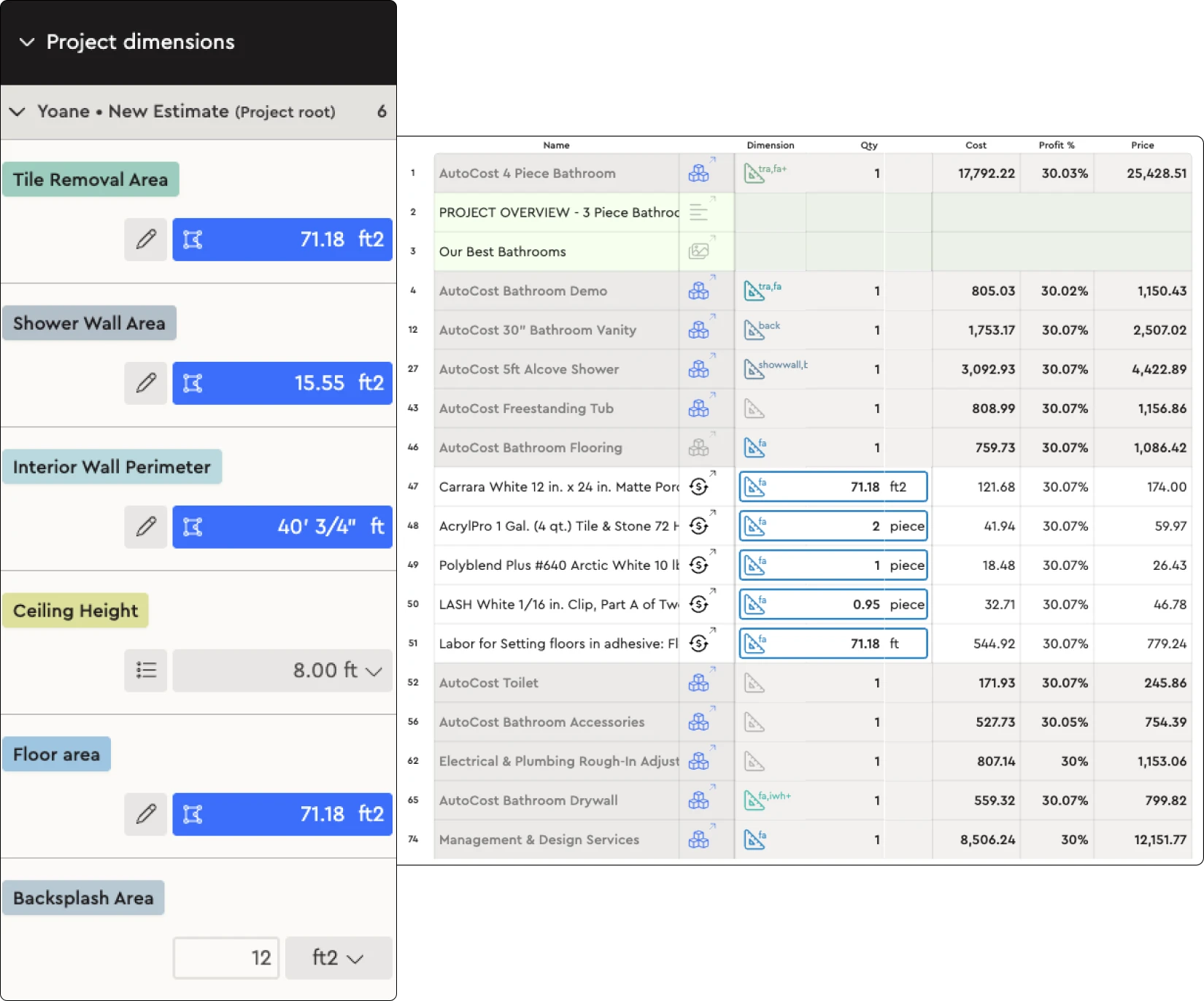
- Link to items, assemblies and calculations. Draw a measurement once and link it to every assembly that needs it. Floor area can drive flooring, underlayment, baseboard and paint at the same time.
- AI Takeoff. On supported plans, AI Takeoff reads uploaded blueprints and generates material quantities for you to review.
- Export to Excel when you need to send quantities elsewhere.
Because takeoff feeds construction estimating directly, and estimates feed presentations, budgets and schedules, a measurement made once flows all the way through to the client proposal and the material list. Prices come from AutoCost live regional data.
Results from contractors
Baylen Morse at HB Builders uses satellite imagery for takeoffs on renovation work: "Old way: 4 to 5 hours. This way: 30 minutes." Across Bolster's estimating tools, users estimate 84% faster on average.
Who uses Bolster takeoff
Takeoff is used by general contractors, remodelers, and trades such as roofing and siding, fencing, landscaping and flooring. Book a demo and we will run a takeoff on one of your current plans.
Frequently asked questions
What is construction takeoff software?
It is software for measuring quantities (areas, lengths, volumes and counts) from digital plans, photos or satellite images. The best takeoff software links those measurements directly to your estimate so quantities turn into priced materials and labor.
What is a takeoff in construction?
A takeoff is the process of extracting measurable quantities from a project's drawings or site so the job can be priced. It is also called a quantity takeoff or material takeoff.
What is the difference between a takeoff and an estimate?
The takeoff measures how much of everything the job needs. The estimate applies costs, labor and markup to those quantities to produce a price. In Bolster the two are connected, so the estimate updates when a measurement changes.
Can I do a takeoff without plans?
Yes. In Bolster you can measure from satellite imagery of the property or draw the layout from your own site measurements, which is common for remodels, roofing, fencing and landscaping.
Is AI takeoff accurate?
AI takeoff gives you a fast first pass of quantities from uploaded plans. You should always review and adjust it, the same way you would check a junior estimator's work. It saves the most time on large or repetitive plans.
Can I export my takeoff to Excel?
Yes. Bolster exports measurements and project data to Excel when you need to share quantities with a supplier or subcontractor.